


Maltego: Connecting the Dots in the Digital World
What Is Maltego, and Why Is It an Essential Tool for Open-Source Intelligence (OSINT)?
Cybersecurity investigations and digital forensics have evolved significantly in recent years. As traditional evidence has shifted toward digital footprints scattered across the internet, manually tracing complex cases has become increasingly difficult for information security analysts and law enforcement agencies.
This is where Maltego stands out as one of the leading tools for graphical link analysis and Open-Source Intelligence (OSINT).
Originally developed by Paterva and first released in 2008, Maltego has supported numerous digital investigations worldwide. Its core strength lies in transforming complex, scattered information into interactive visual graphs that connect digital entities such as domain names, IP addresses, personal accounts, email addresses, cryptocurrency transactions, and website infrastructure.
Understanding the Core Components of Maltego
To use Maltego effectively, it is important to understand the four fundamental components that form the foundation of the platform.
1. Entities
An entity is the basic building block of any Maltego graph. It represents an individual data element that you want to investigate, such as an email address, phone number, person's name, domain name, IP address, or Bitcoin wallet.
Maltego provides dozens of predefined entity types and allows users to create custom entities to meet specific investigation requirements.
2. Transforms
Transforms are automated processes that take an entity as input, query external data sources, and return new, related entities.
Depending on the installed integrations and available permissions, these sources may include WHOIS, DNS, Shodan, VirusTotal, and other intelligence services.
For example, running a transform on a domain entity may reveal the IP addresses associated with that domain.
3. Transform Hub
The Transform Hub is an integrated catalog that allows users to install and configure transforms provided by Maltego, its partners, and third-party security platforms.
Examples of supported integrations include Censys, CrowdStrike, VirusTotal, and Social Links. Some integrations are available for free, while others require subscriptions or API keys.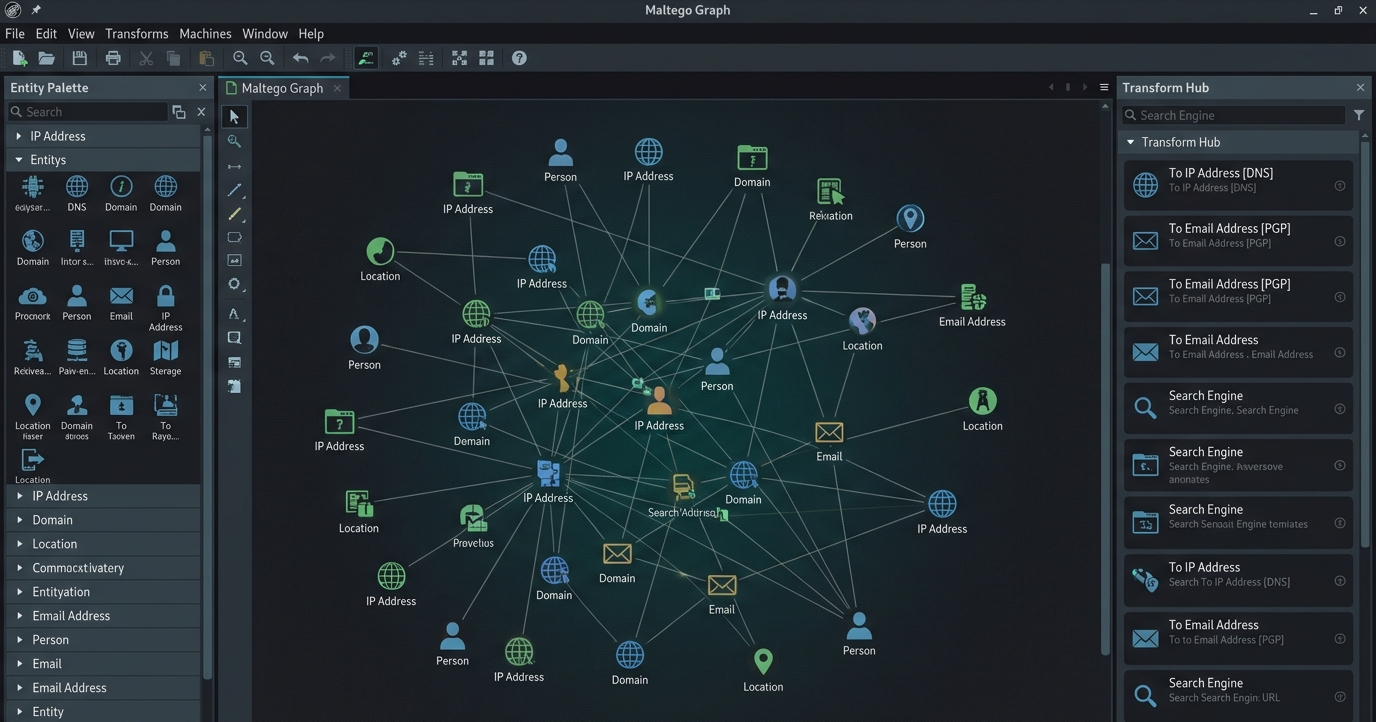
4. Machines and Automated Analysis
Machines are automated workflows that execute sequences of transforms with minimal manual intervention.
For example, an investigation workflow can collect publicly available email addresses associated with a domain and explore their relationships with other publicly available information.
The exact capabilities depend on the installed integrations, available data, and the user's subscription.
Step-by-Step Guide: How to Start a Digital Investigation
Step 1: Install Maltego and Set Up Your Account
Maltego supports Windows, macOS, and Linux. Some cybersecurity distributions, including Kali Linux, may provide installation options through their package repositories.
After launching the application, create or sign in to your Maltego account. The free Community Edition provides an entry point for learning the platform and exploring its basic capabilities.
Step 2: Configure the Transform Hub
Open the Transform Hub and review the integrations available under your subscription plan.
Install the integrations relevant to your investigation. Some services may require you to register with the provider and configure an API key before their transforms can be used.
Step 3: Create a New Graph and Add Entities
Create a new graph and use the Entity Palette to select and add an entity to the workspace.
For example:
Select a Domain entity and enter a domain you are authorized to investigate, such as
example.com.Select a Person or Phrase entity when conducting an investigation based on a name or search phrase.
Start with a clearly defined research question to keep the investigation focused.
Step 4: Run Transforms and Expand the Graph (Pivoting)
Right-click an entity and select an appropriate transform to discover related information.
Examples include:
To DNS Name – NS: Identify the domain's name servers.
To IP Address: Discover IP addresses associated with the domain.
To Email Addresses: Identify publicly available email addresses found on relevant webpages, where supported.
SOCMINT Transforms: Explore publicly available social media information through supported integrations.
Each successful transform can add new entities and relationships to the graph, allowing the investigation to expand step by step.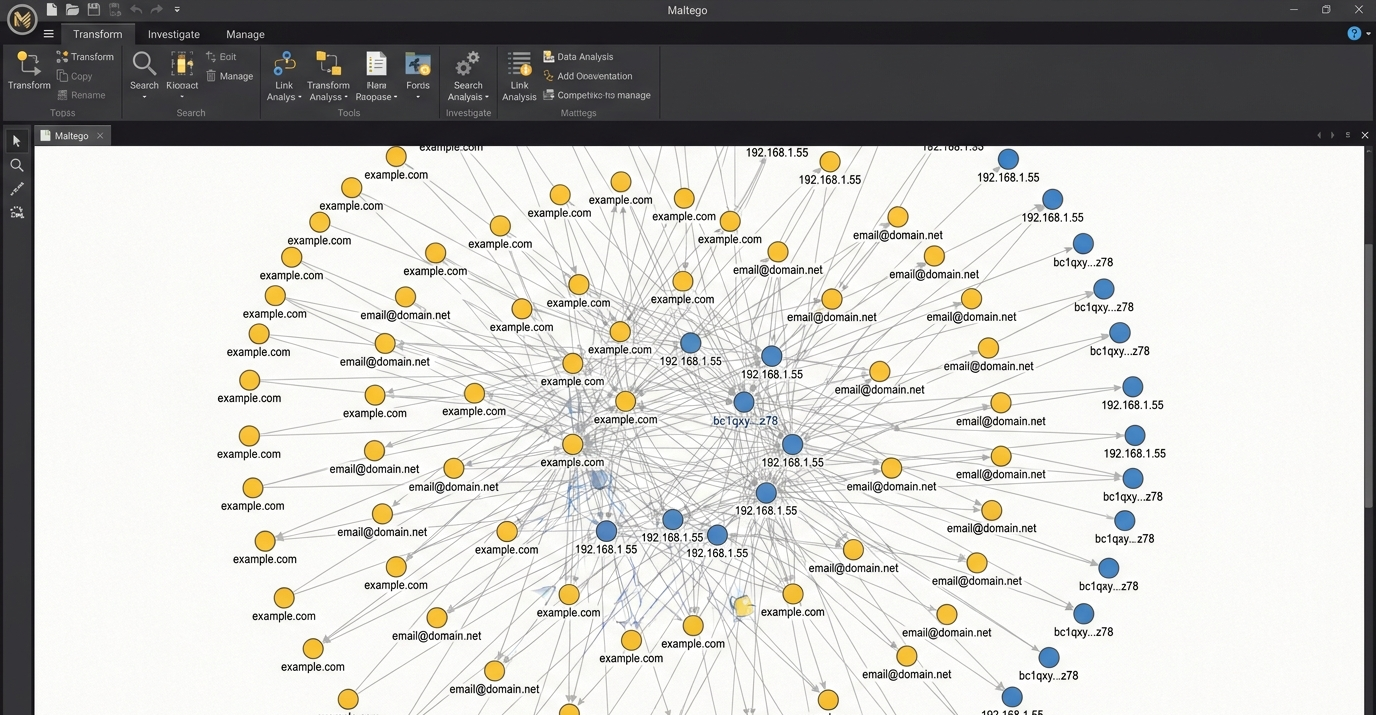
Step 5: Organize the Graph Using Views and Layouts
As the graph grows to hundreds of entities, organizing the information becomes essential.
Use the View menu and available layout options to improve readability:
Organic Layout: Arranges entities to help reveal relationships and clusters.
Hierarchical Layout: Organizes entities into a structured hierarchy.
Diverse Descent: Helps explore connected entities through successive levels of relationships, depending on the available graph features.
Use these options to reduce visual clutter and focus on the connections most relevant to the investigation.
Practical Maltego Use Cases in Cybersecurity
Scenario 1: Person-of-Interest Investigations
An analyst begins with a name or search phrase and examines relevant publicly available sources, such as professional profiles, personal websites, and published records.
The analyst can then investigate publicly disclosed contact details and social media profiles, where available, to build a relationship graph.
Objective: Identify relevant public information and connections while verifying that different records refer to the same person rather than someone with a similar name.
Scenario 2: Malware Infrastructure Tracking
When an analyst receives Indicators of Compromise (IoCs), such as suspicious IP addresses or domain names, these indicators can be entered into Maltego for further investigation.
Supported VirusTotal transforms and other threat intelligence integrations may help identify associated domains, files, and infrastructure.
The resulting graph can reveal relationships between suspicious hosts, files, and infrastructure that may be connected to a malware campaign.
Objective: Understand relationships between threat indicators and support threat investigation and incident response.
Scenario 3: Cryptocurrency Investigations
Maltego can support cryptocurrency investigations by visualizing relationships between blockchain addresses and transactions through supported integrations.
For example, an analyst may examine relationships following this pattern:
Address → Transaction → Address
Data from blockchain explorers and other sources may help identify transaction flows and potential connections with exchange services.
Objective: Visualize transaction relationships and support the analysis of cryptocurrency flows.
Blockchain transactions are often pseudonymous, so identifying the real-world owner of an address generally requires additional evidence. A transaction connection alone does not establish identity or wrongdoing.
Best Practices for Digital Investigators
Define a clear investigation plan: Establish the objective before collecting data to avoid overwhelming the graph with irrelevant information.
Use bookmarks and notes: Highlight important entities and document observations throughout the investigation.
Run transforms selectively: Avoid indiscriminately running every available transform on large graphs, as this can consume query credits or trigger provider rate limits.
Save and reuse configurations: When importing CSV files, save mapping configurations where supported to simplify repeated analysis.
Protect investigation data: Graphs may contain sensitive information. Store them securely and share reports only with authorized parties.
Verify findings: Treat discovered connections as investigative leads and corroborate important findings using reliable independent sources.
Respect privacy and legal requirements: Limit investigations to legitimate purposes and use appropriate authorization when handling personal or organizational data.
Recommendations
Maltego is a valuable tool for cybersecurity professionals, threat intelligence analysts, and digital forensic investigators. By transforming complex and scattered information into visual relationship graphs, it helps users explore connections, identify patterns, and organize investigation findings.
For beginners, the Maltego Community Edition is a practical starting point for learning graph-based analysis and OSINT techniques. Practicing with authorized targets and publicly available test data can help develop the skills needed for more advanced cybersecurity investigations.
To download the program, visit the official website: Maltego